
Overview
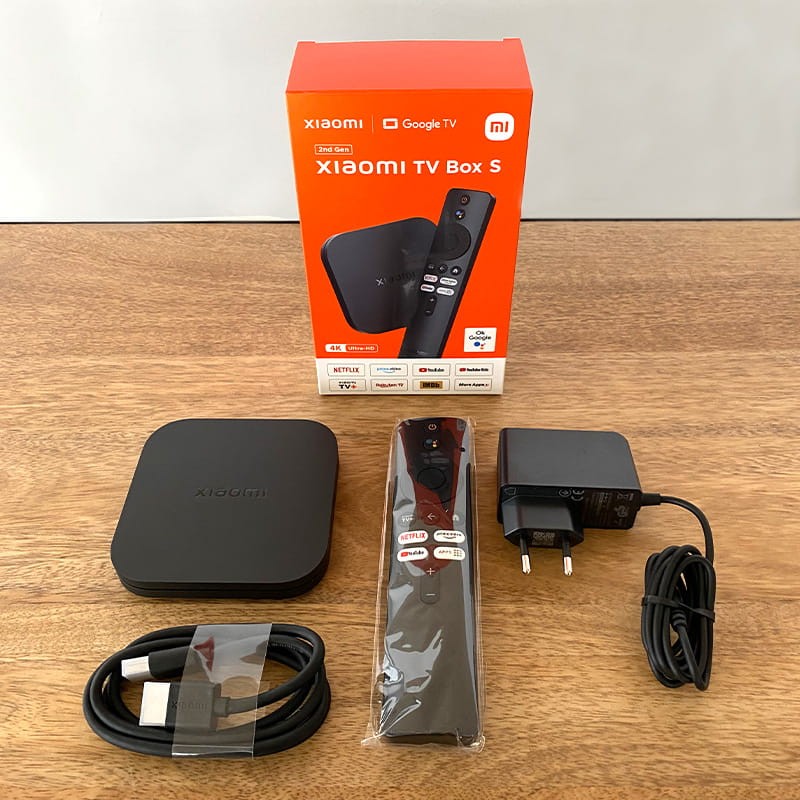
The Xiaomi TV Box S is a compact streaming media player designed to turn any TV with an HDMI input into a smart TV, focusing on accessible performance, broad app support, and simple integration into modern home entertainment setups.
Design
The device features a small, understated enclosure that fits discreetly next to a TV or behind it, prioritizing minimal visual impact and easy cable routing.
The included remote control is slim and ergonomically shaped, with a small set of dedicated buttons for navigation, voice search, and media playback to simplify daily use.
Hardware and Performance
Under the hood, the TV Box S pairs a mid-range system-on-chip with modest RAM and internal storage to support smooth playback of streaming content up to 4K resolution in many common codecs.
Performance is tuned to prioritize video decoding and app responsiveness rather than heavy multitasking, which keeps the user experience fluid for streaming but limits intensive gaming or multitask-heavy scenarios.
Software and Interface
The device runs Google TV (or a closely related Android TV experience), offering a familiar content-centric interface organized around recommendations, apps, and voice search.
Regular software updates and access to a large app catalog ensure compatibility with the major streaming services and third-party apps used by most viewers.
Connectivity
Wi‑Fi and Bluetooth connectivity provide reliable wireless streaming and support for external input devices such as gamepads, keyboards, and wireless headphones.
A single HDMI output, USB port, and microSD or auxiliary ports (depending on model) allow simple expansion options like local media playback or connecting external storage.
Remote and Voice Control
The remote integrates a built‑in microphone for voice commands through the platform’s assistant, enabling quick searches, playback control, and smart-home queries.
Its minimalist layout reduces clutter, while a dedicated power and input shortcut button streamline switching sources and turning devices on and off.
Media Support
The Xiaomi TV Box S supports a wide range of codecs and formats used by popular streaming platforms, usually including HDR variants for improved contrast and color when paired with compatible displays.
Support for surround audio formats enhances movie and series playback on home theater setups, though actual availability depends on service and app support.
Casual Gaming and Apps
Light gaming and retro emulation perform adequately for casual play, but the device is not intended as a primary console for demanding modern 3D titles.
Emulator and cloud-gaming compatibility extend its entertainment possibilities, provided network latency and controller pairing meet user expectations.
Setup and Installation
Physical setup is straightforward: connect power and HDMI, pair the remote, sign in to the Google account, and complete initial network and privacy prompts to start streaming.
Onboard setup flows guide users through popular streaming app installations and cast/Chromecast configuration to mirror or send content from mobile devices.
Usability and Day-to-Day Experience
The interface surfaces personalized recommendations and watchlists to reduce time spent searching and to surface new content aligned with viewing habits.
Boot and app-launch times are generally quick for consumer-grade boxes, making the device suitable for everyday viewing without noticeable friction.
Energy Use and Noise
The TV Box S emphasizes low idle power consumption and minimal thermal output, allowing it to remain connected long-term without significantly affecting household energy costs.
Passive cooling or a small internal fan keeps operational noise negligible, ensuring it does not interfere with audio playback or quiet viewing environments.
Maintenance and Updates
Firmware updates are delivered over the internet to patch security issues, add features, and improve compatibility with streaming platforms, and users should install them when prompted.
Occasional app management is recommended to reclaim storage, since onboard memory can fill up with cached data from multiple streaming services.
Compatibility and Limitations
While broadly compatible with most modern TVs and AV receivers, advanced features like Dolby Vision passthrough, certain DRM-protected streams, or the highest bitrate formats may vary by model and regional firmware.
Users planning a high-end home theater should verify specific format support and HDMI version compatibility with their display and sound system.
Value and Recommendation
The Xiaomi TV Box S delivers a compelling balance of price, convenience, and streaming capability for users who want to upgrade older TVs or add a reliable smart platform without spending on a premium set.
It is best suited for viewers seeking simple, dependable access to mainstream streaming services, occasional casual gaming, and easy voice control rather than cutting-edge gaming or pro-level AV features.